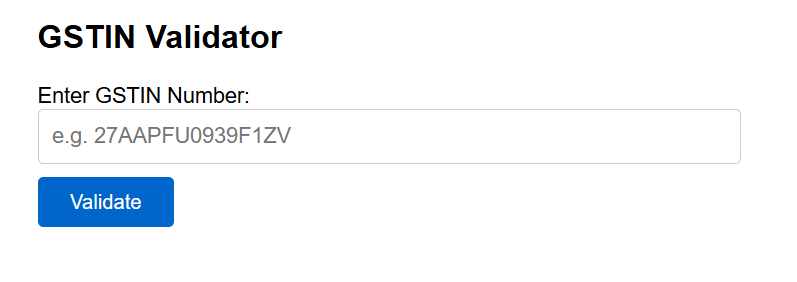
In this tutorial, I will show you exactly how to validate a GSTIN in PHP using regex, with a checksum verification so you catch even subtly wrong numbers. I have also built a free live GSTIN validator tool at the bottom of this post — paste any GSTIN and it validates instantly.
Hi friends, actually i was wondering in internet to check the correct GSTIN but none of the proper checking tool found. So I thought it would be better to create a tool so that everyone can check the GSTIN validation before filling any invoice.
What is a GSTIN?
A GSTIN is a 15-character unique identification number assigned to every GST-registered business in India. It is printed on every tax invoice and is required for Input Tax Credit (ITC) claims.
The format is:
| Position | Characters | Meaning | Example |
|---|---|---|---|
| 1–2 | 2 digits | State code (01–38) | 27 = Maharashtra |
| 3–12 | 10 characters | PAN number of taxpayer | AAPFU0939F |
| 13 | 1 digit | Entity registration number (1–9) | 1 |
| 14 | 1 letter | Always the letter Z | Z |
| 15 | 1 alphanumeric | Checksum character | V |
Full example: 27AAPFU0939F1ZV
Required steps to validate a GSTIN in PHP using regex
Method 1: Simple Regex Validation (Basic)
The quickest way to validate a GSTIN in PHP using Regex. This checks the structure but does not verify the checksum.
<?php

function validateGSTIN($gstin) {
    // Convert to uppercase
    $gstin = strtoupper(trim($gstin));

    // GSTIN regex pattern
    // 2 digits (state) + 5 letters + 4 digits + 1 letter + 1 alphanumeric + Z + 1 alphanumeric
    $pattern = '/^[0-3][0-9][A-Z]{5}[0-9]{4}[A-Z][0-9A-Z]Z[0-9A-Z]$/';

    if (strlen($gstin) !== 15) {
        return ['valid' => false, 'message' => 'GSTIN must be exactly 15 characters.'];
    }

    if (!preg_match($pattern, $gstin)) {
        return ['valid' => false, 'message' => 'GSTIN format is invalid.'];
    }

    return ['valid' => true, 'message' => 'GSTIN format is valid.'];
}

// Test it
$result = validateGSTIN('27AAPFU0939F1ZV');
echo $result['message']; // Output: GSTIN format is valid.

$result2 = validateGSTIN('INVALIDGSTIN123');
echo $result2['message']; // Output: GSTIN format is invalid.
?>
Method 2: Regex + Checksum Validation (Recommended)
The regex above only checks the format. A GSTIN can pass regex but still be wrong — for example if someone changes one character. The official GST checksum algorithm catches this. This is what the GST portal itself uses.
<?php

function validateGSTINWithChecksum($gstin) {
    $gstin = strtoupper(trim($gstin));

    // Step 1: Length check
    if (strlen($gstin) !== 15) {
        return ['valid' => false, 'message' => 'GSTIN must be exactly 15 characters.'];
    }

    // Step 2: Format check
    $pattern = '/^[0-3][0-9][A-Z]{5}[0-9]{4}[A-Z][0-9A-Z]Z[0-9A-Z]$/';
    if (!preg_match($pattern, $gstin)) {
        return ['valid' => false, 'message' => 'GSTIN format is invalid.'];
    }

    // Step 3: State code check (01 to 38)
    $stateCode = (int) substr($gstin, 0, 2);
    if ($stateCode < 1 || $stateCode > 38) {
        return ['valid' => false, 'message' => 'Invalid state code in GSTIN.'];
    }

    // Step 4: Checksum validation (official GST Mod-36 algorithm)
    $chars    = '0123456789ABCDEFGHIJKLMNOPQRSTUVWXYZ';
    $sum      = 0;

    for ($i = 0; $i < 14; $i++) {
        $charPos = strpos($chars, $gstin[$i]);
        if ($charPos === false) {
            return ['valid' => false, 'message' => 'Invalid character found in GSTIN.'];
        }
        $product  = $charPos * (($i % 2 === 0) ? 1 : 2);
        $sum     += (int)($product / 36) + ($product % 36);
    }

    $remainder     = $sum % 36;
    $expectedCheck = $chars[(36 - $remainder) % 36];

    if ($gstin[14] !== $expectedCheck) {
        return [
            'valid'   => false,
            'message' => 'GSTIN checksum is invalid. The number may have a typo.'
        ];
    }

    return ['valid' => true, 'message' => 'GSTIN is valid.'];
}

// ✅ Valid GSTIN
$result = validateGSTINWithChecksum('27AAPFU0939F1ZV');
var_dump($result);
// Output: ['valid' => true, 'message' => 'GSTIN is valid.']

// ❌ Wrong checksum (last character changed)
$result2 = validateGSTINWithChecksum('27AAPFU0939F1ZX');
var_dump($result2);
// Output: ['valid' => false, 'message' => 'GSTIN checksum is invalid...']
?>
Why use checksum validation? When a user types their GSTIN manually, they often swap one digit. The checksum catches these typos that the regex cannot. Always use Method 2 in production.
How to Use in a Form (With HTML)
Here is a complete working example with an HTML form and PHP validation together:
<?php
// gstin-form.php

function validateGSTINWithChecksum($gstin) {
    $gstin   = strtoupper(trim($gstin));
    $pattern = '/^[0-3][0-9][A-Z]{5}[0-9]{4}[A-Z][0-9A-Z]Z[0-9A-Z]$/';
    $chars   = '0123456789ABCDEFGHIJKLMNOPQRSTUVWXYZ';

    if (strlen($gstin) !== 15)          return false;
    if (!preg_match($pattern, $gstin))  return false;
    if ((int)substr($gstin,0,2) < 1 || (int)substr($gstin,0,2) > 38) return false;

    $sum = 0;
    for ($i = 0; $i < 14; $i++) {
        $p    = strpos($chars, $gstin[$i]);
        $prod = $p * ($i % 2 === 0 ? 1 : 2);
        $sum += (int)($prod / 36) + ($prod % 36);
    }
    return $gstin[14] === $chars[(36 - ($sum % 36)) % 36];
}

$message = '';
$type    = '';

if ($_SERVER['REQUEST_METHOD'] === 'POST') {
    $gstin = $_POST['gstin'] ?? '';
    if (empty($gstin)) {
        $message = 'Please enter a GSTIN number.';
        $type    = 'error';
    } elseif (validateGSTINWithChecksum($gstin)) {
        $message = '✓ Valid GSTIN: ' . strtoupper(trim($gstin));
        $type    = 'success';
    } else {
        $message = '✗ Invalid GSTIN. Please check and try again.';
        $type    = 'error';
    }
}
?>

<!DOCTYPE html>
<html>
<head>
    <title>GSTIN Validator</title>
    <style>
        body { font-family: Arial, sans-serif; max-width: 500px; margin: 40px auto; padding: 0 20px; }
        input[type="text"] { width: 100%; padding: 10px; font-size: 16px; border: 1px solid #ccc; border-radius: 4px; }
        button { margin-top: 10px; padding: 10px 24px; background: #0066cc; color: white; border: none; border-radius: 4px; font-size: 15px; cursor: pointer; }
        .success { background: #d4edda; color: #155724; padding: 12px; border-radius: 4px; margin-top: 14px; }
        .error   { background: #f8d7da; color: #721c24; padding: 12px; border-radius: 4px; margin-top: 14px; }
    </style>
</head>
<body>
    <h2>GSTIN Validator</h2>
    <form method="POST">
        <label>Enter GSTIN Number:</label>
        <input type="text" name="gstin" maxlength="15" placeholder="e.g. 27AAPFU0939F1ZV"
               value="<?php echo htmlspecialchars($_POST['gstin'] ?? ''); ?>" />
        <button type="submit">Validate</button>
    </form>

    <?php if ($message): ?>
        <div class="<?php echo $type; ?>"><?php echo $message; ?></div>
    <?php endif; ?>
</body>
</html>
Laravel Version — Validation Rule
In Laravel, you can create a custom validation rule for GSTIN so you can reuse it anywhere in your application.
Step 1: Create the Rule
php artisan make:rule GstinRule
Step 2: Add the Logic
<?php
// app/Rules/GstinRule.php

namespace App\Rules;

use Closure;
use Illuminate\Contracts\Validation\ValidationRule;

class GstinRule implements ValidationRule
{
    public function validate(string $attribute, mixed $value, Closure $fail): void
    {
        $gstin   = strtoupper(trim($value));
        $pattern = '/^[0-3][0-9][A-Z]{5}[0-9]{4}[A-Z][0-9A-Z]Z[0-9A-Z]$/';
        $chars   = '0123456789ABCDEFGHIJKLMNOPQRSTUVWXYZ';

        if (strlen($gstin) !== 15 || !preg_match($pattern, $gstin)) {
            $fail('The :attribute must be a valid 15-character GSTIN number.');
            return;
        }

        $stateCode = (int) substr($gstin, 0, 2);
        if ($stateCode < 1 || $stateCode > 38) {
            $fail('The :attribute contains an invalid state code.');
            return;
        }

        // Checksum
        $sum = 0;
        for ($i = 0; $i < 14; $i++) {
            $p    = strpos($chars, $gstin[$i]);
            $prod = $p * ($i % 2 === 0 ? 1 : 2);
            $sum += (int)($prod / 36) + ($prod % 36);
        }

        if ($gstin[14] !== $chars[(36 - ($sum % 36)) % 36]) {
            $fail('The :attribute checksum is invalid. Please check the GSTIN carefully.');
        }
    }
}
Step 3: Use in Controller or Request
<?php
// In your Controller or FormRequest

use App\Rules\GstinRule;

$request->validate([
    'gstin' => ['required', 'string', new GstinRule()],
]);
That’s it. Now Laravel will automatically validate the GSTIN and return a proper error message to your form.
Common Errors and Fixes
| Error | Reason | Fix |
|---|---|---|
| Fails on valid GSTIN | Input has lowercase letters | Always run strtoupper() before validating |
| Fails on valid GSTIN | Input has spaces or hidden characters | Always run trim() before validating |
| Checksum fails on real GSTIN | User typed letter O instead of digit 0 | Show specific error “check character 7 or 8” |
| State code 00 passes regex | Pattern allows 00 | Add explicit check: $stateCode >= 1 |
| Regex pattern not matching | Wrong delimiter in PHP | Use /pattern/ not #pattern# for clarity |
Free Live GSTIN Validator Tool
I built a free online tool so you can validate any GSTIN instantly — no login, no signup. It runs the same regex + checksum logic shown above and shows you the full breakdown including state name, PAN, taxpayer type, and whether the checksum is correct.
Conclusion:-
To summarise what we covered:
- A GSTIN is 15 characters — 2-digit state code + 10-char PAN + entity number + Z + checksum
- Use Method 1 (regex only) for quick format checks in JavaScript on the frontend
- Use Method 2 (regex + checksum) in PHP backend before saving to database — always
- In Laravel, create a custom
GstinRuleso you can reuse it across all your forms - Always
strtoupper()andtrim()the input before validating
If you found this useful, check out my other India-specific developer tools and tutorials:
If you have any questions or face any errors with the code, drop a comment below. I usually reply within a day.