In this tutorial, we will learn how to insert HTML form data into the MySQL database using PHP. we need to know the basic overview of some superglobal variables in PHP. There are some variables, we can access from anywhere in the PHP script that is called superglobal variables. Some of them are defined as follows—-
1. $_SERVER: It is a global variable that holds information about headers, paths, host address, script locations, etc. such as
. $_SERVER[‘PHP_SELF’] = Returns the filename of the currently executing script.
. $_SERVER[‘SERVER_ADDR’] = Returns the IP address of the host server.
. $_SERVER[‘SERVER_NAME’] = Returns the name of the host server such as www.ndtv.com
. $_SERVER[‘REQUEST_METHOD’] = Returns the request method used to access the page.
2. $_REQUEST: It is a superglobal variable that collects data from a form after clicking the submit button.
3. $_POST: It is a global variable that is used to send form data to the server. Data sent from a form with $_POST method is invisible to others. POST method is used to send sensitive information like username and password etc.
4. $_GET: It is a global variable that is used to send form data to the server. Data sent from a form with $_GET method is visible to others via URL. It is used for sending non-sensitive data.
Also read, Introduction to PHP and how it works
How to echo form data after submitting in PHP
<html>
<body>
<form method=”post” action=”<?php echo $_SERVER[‘PHP_SELF’];?>”>
Name: <input type=”text” name=”username”>
<input type=”submit” name=”save” value=”submit”>
</form>
<?php
if ($_SERVER[“REQUEST_METHOD”] == “POST”) {
// collect value of input field
$username = $_REQUEST[‘username’];
if (empty($username)) {
echo “Username is empty”;
} else {
echo $username;
}
}
?>
</body>
</html>
or
<html>
<body>
<form method=”post” action=””>
Name: <input type=”text” name=”username”>
<input type=”submit” name=”save” value=”submit”>
</form>
</body>
</html>
<?php
if (isset($_POST[‘save’]) //here ‘save’ is the name attribute of the button field
{
// collect value of input field
$username = $_POST[‘username’];//here username is the field name of the input type element
echo $username;
}
?>
In the example above a form is given with an input field and a submit button. When a user clicks the submit button, the form data is sent to the file specified in the action attribute of the <form> tag to process the data.
Here we have used the current file for the action of the data with $_SERVER[‘PHP_SELF’] or we can leave the action attribute blank. If we want then we can use a separate PHP file for the action attribute. Then, we can use the super global variable $_REQUEST to collect the value of the input field or we can use $_POST to retrieve the form data from an input field.
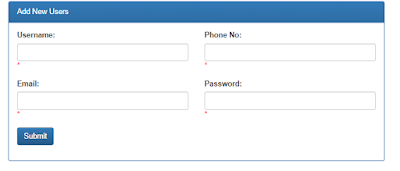
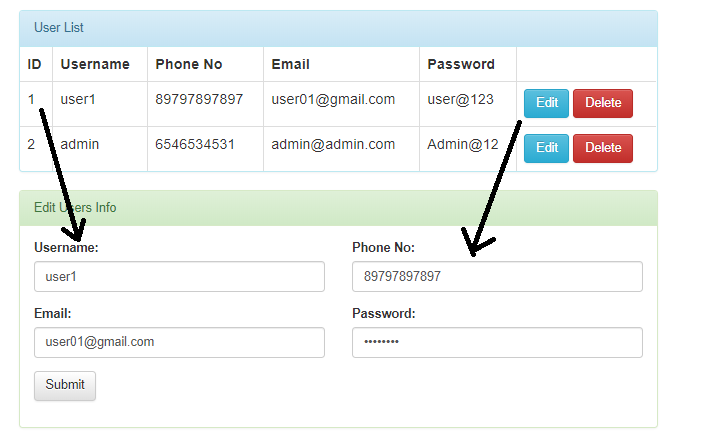
Insert HTML Form Data into Mysql database using PHP and display it in a table
1. Create the database in PHPmyadmin with collation “utfmb4-unicode-ci”.
2. Create a table in the database. Here I am using a table named ‘users’ which contains five fields such as “id”,”username”,”phone_no”,”email”,”password”.
DDL Information of the table:
————————————–
CREATE TABLE `users` (
`id` int(10) unsigned NOT NULL AUTO_INCREMENT,
`username` varchar(100) COLLATE utf8mb4_unicode_ci DEFAULT NULL,
`phone_no` varchar(20) COLLATE utf8mb4_unicode_ci DEFAULT NULL,
`email` varchar(100) COLLATE utf8mb4_unicode_ci DEFAULT NULL,
`password` varchar(100) COLLATE utf8mb4_unicode_ci DEFAULT NULL,
PRIMARY KEY (`id`)
) ENGINE=InnoDB AUTO_INCREMENT=2 DEFAULT CHARSET=utf8mb4 COLLATE=utf8mb4_unicode_ci
Now, we will do the submission with simple form validation in PHP
Also read, Basic overview of PHP variables and data Types
COMPLETE CODE:-
————————–
connect.php
<?php
$servername='localhost';
$username="root";
$password="";
try
{
	$con=new PDO("mysql:host=$servername;dbname=database name",$username,$password);
	$con->setAttribute(PDO::ATTR_ERRMODE,PDO::ERRMODE_EXCEPTION);
	//echo 'connected';
}
catch(PDOException $e)
{
	echo '<br>'.$e->getMessage();
}

?>
<?php
include('connect.php');
//insert data into database
$username_err=$phone_err=$email_err=$password_err='';
if(isset($_POST['save'])){
//inserting form data with validation
			if(empty($_POST['username'])){
				$username_err = 'Username is required';
			}
			else{
				$username = $_POST['username'];
				//check username
				if(strlen($username)<4 || strlen($username)>6){
					$username_err="Username should be 4 to 6 characters long";
				}
			}
			if(empty($_POST['phone_no'])){
				$phone_err = 'Phone No is required';
			}
			else{
				$phone_no = $_POST['phone_no'];
				if(!is_numeric($phone_no)){
					$phone_err = "Phone No should be numeric";
				}
				elseif(strlen($phone_no)>10 || strlen($phone_no)<10){
					$phone_err = "Can not be greater than 10 digits or less than 10 digits!";
				}
			}
			if(empty($_POST['email'])){
				$email_err = 'Email is required';
			}
			else{
				$email = $_POST['email'];
				//check email
				if (!filter_var($email, FILTER_VALIDATE_EMAIL))
				{
					$email_err = "Invalid email format";
				}
			else
				{
					$stmt=$con->prepare("select email from `users` where email='$email'");
					$stmt->execute();
					$rows1 =$stmt->fetch(PDO::FETCH_ASSOC);
					if($rows1!==false)
					{
						$email_err ='This email already exist....please try another';
					}
				}
			}
			if(empty($_POST['password'])){
				$password_err = 'Password is required';
			}
			else{
				$password = $_POST['password'];
				//validate PASSWORD
				if(!preg_match("((?=.*\d)(?=.*[a-z])(?=.*[A-Z])(?=.*[@#$%]).{6,20})",$password)){

				$password_err="Password should contain uppercase and lowercase letters with mix of special characters and digits and at least 6 characters long";
				}
			}
	if($username_err=='' && $phone_err=='' && $email_err=='' && $password_err==''){

				$username = $_POST['username'];
				$phone_no = $_POST['phone_no'];
				$email 	  = $_POST['email'];
				$password = $_POST['password'];

		$sql="INSERT INTO users(username,phone_no,email,password)VALUES('$username','$phone_no','$email','$password')";
		$stmt=$con->prepare($sql);
		$stmt->execute();
		echo "<script type='text/javascript'>";
		echo "alert('Submitted successfully')";
		echo "</script>";
	}
	/*echo "<script type='text/javascript'>";
	echo "alert('Submitted successfully'.$username)";
	echo "</script>";*/

}
//Display the output from the database
	$stmt1=$con->prepare("SELECT * FROM users order by id asc");
	$stmt1->execute();
	$rows =$stmt1->fetchAll(PDO::FETCH_ASSOC);
//Edit the table data
if(isset($_GET['edit'])){
	$edit_id = $_GET['edit'];
	$stmt2=$con->prepare("SELECT * FROM users where id='$edit_id'");
	$stmt2->execute();
	$edit_details =$stmt2->fetch(PDO::FETCH_ASSOC);
	}
//update the data
	if(isset($_POST['update']))
    {

		$user_name=$_POST['username'];
		$phone_no=$_POST['phone_no'];
		$email=$_POST['email'];
		$password=$_POST['password'];
		$stmt=$con->prepare("update users set username='$user_name',phone_no='$phone_no',email='$email',password='$password' where id='$edit_id'");
		$stmt->execute();
		echo "<script type='text/javascript'>";
		echo "alert('Record updated successfully')";
		echo "</script>";
		echo "<script type='text/javascript'>";
		echo "window.location='formsubmit.php'";
		echo "</script>";

	}
//delete the data
if(isset($_GET['delete'])){
	$delete_id = $_GET['delete'];
	$stmt3=$con->prepare("delete from users where id='$delete_id'");
	$stmt3->execute();
	echo "<script type='text/javascript'>";
		echo "alert('Record deleted successfully')";
		echo "</script>";
		echo "<script type='text/javascript'>";
		echo "window.location='formsubmit.php'";
		echo "</script>";
	}

?>
<html>
<head>
<title>Form Submission</title>
<link rel="stylesheet" href="bootstrap.css" crossorigin="anonymous">
<!-- Optional theme -->
<link rel="stylesheet" href="bootstrap-theme.css" crossorigin="anonymous">

<style>
.container{
	width:50%;
	height:30%;
	padding:20px;

}


</style>
</head>
<body>
	<div class="container">
	<div class="panel panel-primary">
	<div class="panel-heading">Add New Users</div>
    <div class="panel-body">
		<form action="" method="post">
			<div class="row">
				<div class="col-sm-6">
					<div class="form-group">
					    <label for="username">Username:</label>
					    <input type="text" value="<?php echo isset($_POST["username"]) ? $_POST["username"] : '';?>" class="form-control" id="user" name="username">
					    <span class="error" style="color: #ff0000"><?php echo $username_err;?>*</span>
					</div>
				</div>
				<div class="col-sm-6">
					<div class="form-group">
					    <label for="phone_no">Phone No:</label>
					    <input type="text" value="<?php echo isset($_POST["phone_no"]) ? $_POST["phone_no"] : '';?>" class="form-control" id="phone" name="phone_no">
					    <span class="error" style="color: #ff0000"><?php echo $phone_err;?>*</span>
					</div>
				</div>
			</div>
			<div class="row">
				<div class="col-sm-6">
					<div class="form-group">
					    <label for="Email">Email:</label>
					    <input type="email" value="<?php echo isset($_POST["email"]) ? $_POST["email"] : '';?>" class="form-control" id="email" name="email">
					    <span class="error" style="color: #ff0000"><?php echo $email_err;?>*</span>
					</div>
				</div>
				<div class="col-sm-6">
					<div class="form-group">
					    <label for="Password">Password:</label>
					    <input type="password" value="<?php echo isset($_POST["password"]) ? $_POST["password"] : '';?>" class="form-control" id="pass" name="password">
					    <span class="error" style="color: #ff0000"><?php echo $password_err;?>*</span>
					</div>
				</div>
			</div>
			  <button type="submit" class="btn btn-primary" name="save">Submit</button>
		</form>
	</div>
</div>
		<br/>
<div class="panel panel-info">
	<div class="panel-heading">User List</div>
		<table class="table table-bordered">
			<thead>
			      <tr>
			      	<th>ID</th>
			        <th>Username</th>
			        <th>Phone No</th>
			        <th>Email</th>
			        <th>Password</th>
			        <th></th>
			      </tr>
			</thead>
			<tbody>
			<?php
			if(!$rows){
				echo '<tr>
						<td colspan="4">No data available.</td>
					 </tr>';
			}
			else{
				foreach($rows as $row)
				{
					?>
					<tr>
							<td><?php echo $row['id'];?></td>
					        <td><?php echo $row['username'];?></td>
					        <td><?php echo $row['phone_no'];?></td>
					        <td><?php echo $row['email'];?></td>
					        <td><?php echo $row['password'];?></td>
					        <td><a class="btn btn-info" onclick="return confirm('Are you sure?')" href="formsubmit.php?edit=<?php echo $row['id']?>">Edit</a>
					        <a class="btn btn-danger" onclick="return confirm('Are you sure?')" href="formsubmit.php?delete=<?php echo $row['id']?>">Delete</a></td>
					</tr>
					<?php
				}
			}

			?>

			</tbody>
  		</table>
	</div>
	<!--Edit users list-->
<?php
	if(isset($_GET['edit'])){

		?>
		<div class="panel panel-success">
	<div class="panel-heading">Edit Users Info</div>
    <div class="panel-body">
		<form action="" method="post">
			<div class="row">
				<div class="col-sm-6">
					<div class="form-group">
					    <label for="username">Username:</label>
					    <input type="text" class="form-control" id="user" value="<?php echo $edit_details['username']?>" name="username" required="">
					</div>
				</div>
				<div class="col-sm-6">
					<div class="form-group">
					    <label for="phone_no">Phone No:</label>
					    <input type="text" value="<?php echo $edit_details['phone_no']?>" class="form-control" id="phone" name="phone_no" required="">
					</div>
				</div>
			</div>
			<div class="row">
				<div class="col-sm-6">
					<div class="form-group">
					    <label for="Email">Email:</label>
					    <input type="email" value="<?php echo $edit_details['email']?>" class="form-control" id="email" name="email" required="">
					</div>
				</div>
				<div class="col-sm-6">
					<div class="form-group">
					    <label for="Password">Password:</label>
					    <input type="password" value="<?php echo $edit_details['password']?>" class="form-control" id="pass" name="password" required="">
					</div>
				</div>
			</div>
			  <button type="submit" class="btn btn-default" name="update">Submit</button>
		</form>
	</div>
</div>
		<?php
	}

?>
</div>
<script src="jquery-3.2.1.min.js"></script>
<script src="bootstrap.min.js"></script>

</body>
</html>
NOTE*
Download the bootstrap CSS and js files from google and include the path of the files in the href attribute of the link tag and src attribute of the script tag respectively.
CONCLUSION:- I hope this article will help you to understand how to insert HTML form data into the MySQL database. If you have any doubt then please leave your comment below.
where is the connect.php file?