
Hi friends, in this tutorial, you will learn how to disable right-click on PDF viewer using javascript and display the PDF document on the browser using modal without any download option and save option. You might find many solutions to this but you have to give it some time. If you are wondering to resolve this in less time then my tutorial is the one-stop solution. To do so, please follow the below steps.
Also read, How To Display PDF File in PHP on Browser
Steps to disable right-click on PDF viewer using javascript
Step 1:- Create an HTML file and paste the below code.
<!doctype html>
<html lang="en">
  <head>
    <!-- Required meta tags -->
    <meta charset="utf-8">
    <meta name="viewport" content="width=device-width, initial-scale=1">

    <!-- Bootstrap CSS -->
    <link href="https://cdn.jsdelivr.net/npm/bootstrap@5.0.2/dist/css/bootstrap.min.css" rel="stylesheet" integrity="sha384-EVSTQN3/azprG1Anm3QDgpJLIm9Nao0Yz1ztcQTwFspd3yD65VohhpuuCOmLASjC" crossorigin="anonymous">
    <link rel="stylesheet" href="https://cdnjs.cloudflare.com/ajax/libs/font-awesome/4.7.0/css/font-awesome.min.css">

    <title>Disable right click on PDF viewer using JavaScript</title>
  </head>
  <body>

    <div class="container mt-5">
          <h3>Disable right click on PDF viewer using JavaScript</h3    >
          <div style="border: 1px solid black;" class="mt-1 mb-3"></div>
          <div class="table-responsive">
            <table class="table table-bordered">
              <thead>
                <tr>
                  <th scope="col">#</th>
                  <th scope="col">Document Title</th>
                  <th scope="col">Document Type</th>
                  <th scope="col">Action</th>
                </tr>
              </thead>
              <tbody>
                <tr>
                  <td>1</td>
                  <td>Sample PDF</td>
                  <td><i class="fa fa-file-pdf-o" style="font-size:36px;color:red;"></i></td>
                  <td><button class="btn btn-info btn-sm" data-bs-toggle="modal" data-bs-target="#pdfModal">View</button></td>
                </tr>
              </tbody>
            </table>
          </div>
        </div>

  <!-- Modal -->
    <div class="modal fade" id="pdfModal" tabindex="-1" aria-labelledby="pdfModalLabel" aria-hidden="true">
      <div class="modal-dialog modal-lg">
        <div class="modal-content">
          <div class="modal-header">
            <h5 class="modal-title" id="pdfModalLabel">Disable right click on PDF viewer using JavaScript</h5>
            <button type="button" class="btn-close" data-bs-dismiss="modal" aria-label="Close"></button>
          </div>
          <div class="modal-body">
            <div id="pdf-container" style="position: relative; overflow: auto; height: 500px;">
              <canvas id="pdf-canvas" width="100%"></canvas>
            </div>
          </div>
          <div class="modal-footer">
            <button type="button" class="btn btn-secondary" data-bs-dismiss="modal">Close</button>
          </div>
        </div>
      </div>
    </div>

    <!-- Option 1: Bootstrap Bundle with Popper -->
    <script src="https://cdn.jsdelivr.net/npm/bootstrap@5.0.2/dist/js/bootstrap.bundle.min.js" integrity="sha384-MrcW6ZMFYlzcLA8Nl+NtUVF0sA7MsXsP1UyJoMp4YLEuNSfAP+JcXn/tWtIaxVXM" crossorigin="anonymous"></script>

  </body>
</html>
Step 2:- Put any PDF file where the HTML file is located or any desired location.
Step 3:- Place the CDN link before the script tag as given below
<script src="https://cdnjs.cloudflare.com/ajax/libs/pdf.js/2.10.377/pdf.min.js"></script>
Step 4:- Paste the code below inside the HTML file’s script tag.
<script>
    document.addEventListener('DOMContentLoaded', function() {
      var url = 'how_to_search_for_a_word_in_a_pdf';

      // Disable right-click globally on the canvas
      var pdfCanvas = document.getElementById('pdf-canvas');
      pdfCanvas.addEventListener('contextmenu', function(e) {
        e.preventDefault();
      });

      // Asynchronous download of PDF
      var loadingTask = pdfjsLib.getDocument(url);
      loadingTask.promise.then(function(pdf) {
        // Fetch the first page
        pdf.getPage(1).then(function(page) {
          var scale = 1.5;
          var viewport = page.getViewport({scale: scale});

          // Prepare canvas using PDF page dimensions
          var canvas = document.getElementById('pdf-canvas');
          var context = canvas.getContext('2d');
          canvas.height = viewport.height;
          canvas.width = viewport.width;

          // Render PDF page into canvas context
          var renderContext = {
            canvasContext: context,
            viewport: viewport
          };
          var renderTask = page.render(renderContext);
          renderTask.promise.then(function () {
            console.log('Page rendered');
          });
        });
      }, function (reason) {
        console.error(reason);
      });
    });
  </script
Complete Code:-
<!doctype html>
<html lang="en">
  <head>
    <!-- Required meta tags -->
    <meta charset="utf-8">
    <meta name="viewport" content="width=device-width, initial-scale=1">

    <!-- Bootstrap CSS -->
    <link href="https://cdn.jsdelivr.net/npm/bootstrap@5.0.2/dist/css/bootstrap.min.css" rel="stylesheet" integrity="sha384-EVSTQN3/azprG1Anm3QDgpJLIm9Nao0Yz1ztcQTwFspd3yD65VohhpuuCOmLASjC" crossorigin="anonymous">
    <link rel="stylesheet" href="https://cdnjs.cloudflare.com/ajax/libs/font-awesome/4.7.0/css/font-awesome.min.css">

    <title>Disable right click on PDF viewer using JavaScript</title>
  </head>
  <body>

    <div class="container mt-5">
          <h3>Disable right click on PDF viewer using JavaScript</h3>
          <div style="border: 1px solid black;" class="mt-1 mb-3"></div>
          <div class="table-responsive">
            <table class="table table-bordered">
              <thead>
                <tr>
                  <th scope="col">#</th>
                  <th scope="col">Document Title</th>
                  <th scope="col">Document Type</th>
                  <th scope="col">Action</th>
                </tr>
              </thead>
              <tbody>
                <tr>
                  <td>1</td>
                  <td>Sample PDF</td>
                  <td><i class="fa fa-file-pdf-o" style="font-size:36px;color:red;"></i></td>
                  <td><button class="btn btn-info btn-sm" data-bs-toggle="modal" data-bs-target="#pdfModal">View</button></td>
                </tr>
              </tbody>
            </table>
          </div>
        </div>

  <!-- Modal -->
    <div class="modal fade" id="pdfModal" tabindex="-1" aria-labelledby="pdfModalLabel" aria-hidden="true">
      <div class="modal-dialog modal-lg">
        <div class="modal-content">
          <div class="modal-header">
            <h5 class="modal-title" id="pdfModalLabel">Disable right click on PDF viewer using JavaScript</h5>
            <button type="button" class="btn-close" data-bs-dismiss="modal" aria-label="Close"></button>
          </div>
          <div class="modal-body">
            <div id="pdf-container" style="position: relative; overflow: auto; height: 500px;">
              <canvas id="pdf-canvas" width="100%"></canvas>
            </div>
          </div>
          <div class="modal-footer">
            <button type="button" class="btn btn-secondary" data-bs-dismiss="modal">Close</button>
          </div>
        </div>
      </div>
    </div>

    <!-- Option 1: Bootstrap Bundle with Popper -->
    <script src="https://cdn.jsdelivr.net/npm/bootstrap@5.0.2/dist/js/bootstrap.bundle.min.js" integrity="sha384-MrcW6ZMFYlzcLA8Nl+NtUVF0sA7MsXsP1UyJoMp4YLEuNSfAP+JcXn/tWtIaxVXM" crossorigin="anonymous"></script>

    <!-- PDF.js Library -->
  <script src="https://cdnjs.cloudflare.com/ajax/libs/pdf.js/2.10.377/pdf.min.js"></script>

  <script>
    document.addEventListener('DOMContentLoaded', function() {
      var url = 'how_to_search_for_a_word_in_a_pdf';

      // Disable right-click globally on the canvas
      var pdfCanvas = document.getElementById('pdf-canvas');
      pdfCanvas.addEventListener('contextmenu', function(e) {
        e.preventDefault();
      });

      // Asynchronous download of PDF
      var loadingTask = pdfjsLib.getDocument(url);
      loadingTask.promise.then(function(pdf) {
        // Fetch the first page
        pdf.getPage(1).then(function(page) {
          var scale = 1.5;
          var viewport = page.getViewport({scale: scale});

          // Prepare canvas using PDF page dimensions
          var canvas = document.getElementById('pdf-canvas');
          var context = canvas.getContext('2d');
          canvas.height = viewport.height;
          canvas.width = viewport.width;

          // Render PDF page into canvas context
          var renderContext = {
            canvasContext: context,
            viewport: viewport
          };
          var renderTask = page.render(renderContext);
          renderTask.promise.then(function () {
            console.log('Page rendered');
          });
        });
      }, function (reason) {
        console.error(reason);
      });
    });
  </script>

  </body>
</html>
Explanation of the above code:-
- In the above code, you have noticed that addEventListener is added to add an event.
- DomContentLoaded() is an event that is loaded fully after the HTML page loads all the CDNs or any script sources and remember it does not wait for stylesheets or any kind of images to load.
- Next, we will capture the URL of the document which you want to display it might be in PDF format or JPG, PNG, etc.
- Next, we will disable the right click globally on the canvas element with the help of contextmenu event as given below
pdfCanvas.addEventListener('contextmenu', function(e) {
e.preventDefault();
});
- pdfjsLib.getDocument(url) function starts the loading process and promise() function is used to check whether the document is successfully loaded or not.
- Next, it will render the first page of the document with the help of pdf.getPage(1).then(function(page). then() is used when the page is successfully loaded.
- The remaining code will be used to render the whole document using the viewport with dimensions.
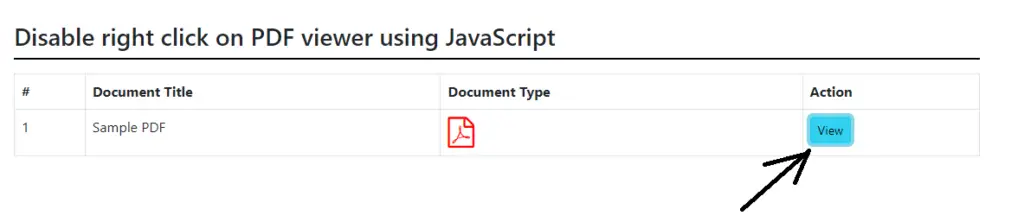
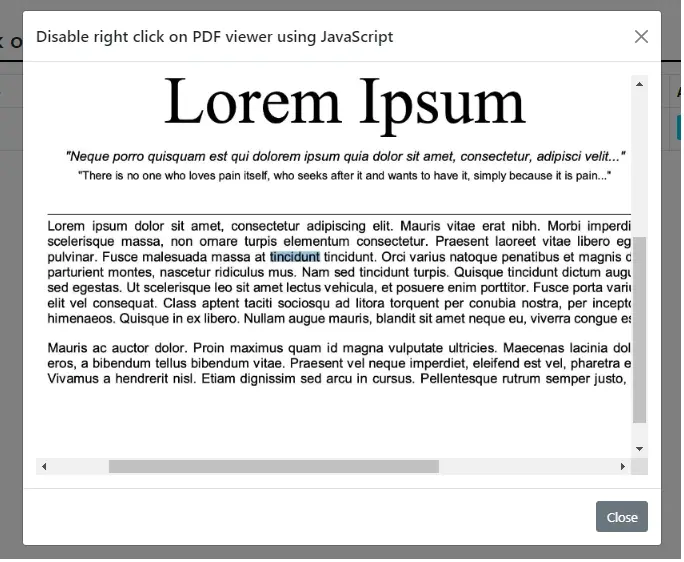
Now, if you hit the html file from the browser then you can see the document displayed on the modal as given below.
Conclusion:- I hope this tutorial will help you to open any PDF document on the browser without any download and disable right-click on pdf viewer using javascript. If there is any doubt then please leave a comment below.