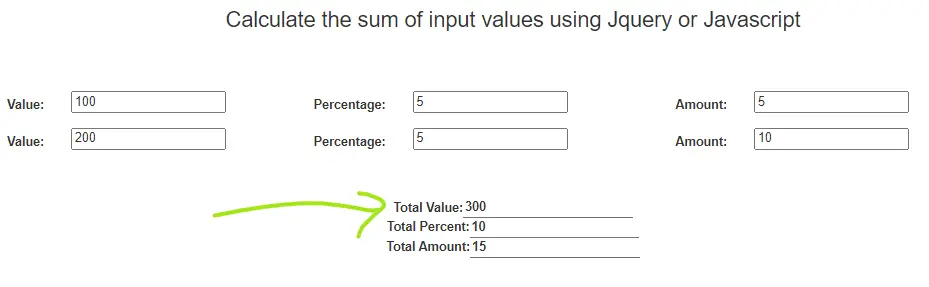
In this tutorial, we will learn to auto calculate the sum of input values using jQuery or JavaScript. Sometimes we need addition, subtraction, division, multiplication, and percentage, etc. in a webpage on the fly i.e. without reloading the page or submitting the page. With the help of JavaScript events, we can find the values.
In this example, three input fields are taken as shown in the image above. We are finding the amount of some values based on the given percentage.
Required Steps to get the sum of input values using Jquery
- Declare all the input fields with the id attributes of each input field to find the desired values in each row.
- Also declare the input fields with the class attributes of each input field to collect the sum of all the desired fields. Every time we do calculations, the class attribute will help us to find the sum of all inputs.
- We use a JavaScript event called blur as a function. All calculations including the sum of all the input fields are defined inside this function.
Also read, add rows to table dynamically using JavaScript
Complete Code:-
<html>
<head>
<title>ajax example</title>
<link rel="stylesheet" href="bootstrap.css" crossorigin="anonymous">
<!-- Optional theme -->
<link rel="stylesheet" href="bootstrap-theme.css" crossorigin="anonymous">
<style>
.container{
	width:50%;
	height:30%;
	padding:20px;
}
</style>
</head>
<body>
	<div class="container-fluid">
		<h3 align="center">Calculate the sum of input values using Jquery or Javascript</h3>
		<br/><br/><br/>
<form class="form-horizontal" action="#">
	<div id="newuser"></div>
		  <div class="form-group row">
		        <label class="control-label col-sm-2" for="value">Value:</label>
			    <div class="col-sm-2">
			      <input type="text" name="value" id="value" class="value">
			    </div>
			    <label class="control-label col-sm-1" for="Percentage">Percentage:</label>
			    <div class="col-sm-2">
				     <input type="text" name="rate" id="rate" class="rate" onblur="getAmount()">
				</div>
				<label class="control-label col-sm-1" for="Amount">Amount:</label>
			    <div class="col-sm-2">
			      <input type="text" name="amount" id="amount" class="amount">
			    </div>

		  </div>
		  <div class="form-group row">
		        <label class="control-label col-sm-2" for="Value">Value:</label>
			    <div class="col-sm-2">
			      <input type="text" name="value" id="value2" class="value">
			    </div>
			    <label class="control-label col-sm-1" for="Percentage">Percentage:</label>
			    <div class="col-sm-2">
				     <input type="text" name="rate" id="rate2" class="rate" onblur="getAmount()">
				</div>
				<label class="control-label col-sm-1" for="Amount">Amount:</label>
			    <div class="col-sm-2">
			      <input type="text" name="amount" id="amount2" class="amount">
			    </div>

		  </div>
		<br/><br>
		<p style="text-align: center;font-weight: bold;">
      Total Value:<input type="text" style="border: none;border-bottom: 1px solid #756D6D;outline: none;" id="total_value"><br>
      Total Percent:<input type="text" style="border: none;border-bottom: 1px solid #756D6D;outline: none;" id="total_rate"><br>
      Total Amount:<input type="text" style="border: none;border-bottom: 1px solid #756D6D;outline: none;" id="total_amount"><br>
       </p>

</form>
</div>
<script src="jquery-3.2.1.min.js"></script>
<script src="bootstrap.min.js"></script>
<script>
  function getAmount(){
  	var value = $('#value').val();
  	var percent = $('#rate').val();
  	$('#amount').val(value*percent/100);

  	var value2 = $('#value2').val();
  	var percent2 = $('#rate2').val();
  	$('#amount2').val(value2*percent2/100);

  	 //get the sum of each column of each row
  var sum_value = 0;
  $('.value').each(function(){
  	sum_value += +$(this).val();
  	$('#total_value').val(sum_value);
  })

  var sum_rate = 0;
  $('.rate').each(function(){
  	sum_rate += +$(this).val();
    $('#total_rate').val(sum_rate);
  })

  var sum_amount = 0;
  $('.amount').each(function(){
  	sum_amount += +$(this).val();
    $('#total_amount').val(sum_amount);
  })


  }
</script>
</body>
</html>
NOTE*
Download the bootstrap CSS and js files from google and include the path of the files in the href attribute of link tag and src attribute of the script tag respectively.
Also read, How To Export MySQL Table Data Into Excel Using jQuery
To know more about the JavaScript auto calculation, visit here
CONCLUSION:- I hope this article will help you to auto calculate the sum of input fields using Jquery or Javascript easily. If you have any doubt then please leave your comment below.
I have to thank you for the efforts you have put in penning this
website. I am hoping to view the same high-grade blog posts from you in the
future as well. In fact, your creative writing abilities has inspired me to get my very own site now 😉