In this tutorial, we will learn how to display MySQL data in a bootstrap modal on button click using ajax jQuery PHP. It seems very unprofessional to redirect to another web page to view some information. To simplify this problem, we will use a bootstrap modal which looks very user-friendly.
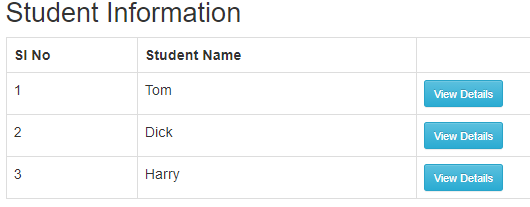
After clicking the button,
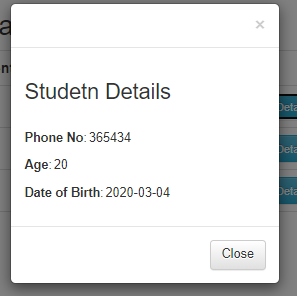
Below are some of the proven steps to be followed
- Create a table in your database.
CREATE TABLE student (id int(10) unsigned NOT NULL AUTO_INCREMENT,student_name varchar(225) COLLATE utf8mb4_unicode_ci DEFAULT NULL,phone_no varchar(225) COLLATE utf8mb4_unicode_ci DEFAULT NULL,age int(20) DEFAULT NULL,date_of_birth date DEFAULT NULL,
PRIMARY KEY (id)
) ENGINE=InnoDB AUTO_INCREMENT=4 DEFAULT CHARSET=utf8mb4 COLLATE=utf8mb4_unicode_ci
2. Fetch the table data on a web page in a tabular format with the help of a PHP script as shown below.
<?php
include('connect.php');
	$stmt = $con->prepare("select * from student");
	$stmt->execute();
	$students = $stmt->fetchAll(PDO::FETCH_ASSOC);
?>
<table class="table table-bordered">
    <thead>
      <tr>
        <th>Sl No</th>
        <th>Student Name</th>
        <th></th>
      </tr>
    </thead>
    <tbody>
   <?php
   foreach ($students as $key => $value) {
   	# code...
   	?>
   	<tr>
            <td><?php echo $key+1;?></td>
            <td><?php echo $value['student_name'];?></td>
   	    <td><button type = "button" class = "btn btn-info btn-sm inv" data-toggle="modal" data-target="#modaldata" id="<?php echo $value['id'];?>">View Details</button></td>
   	</tr>
   <?php
   }
   ?>
    </tbody>
  </table>
3. Create a button in an extra column of the table and include the row id from the database as shown below
<td><button type = "button" class = "btn btn-info btn-sm inv" data-toggle="modal" data-target="#modaldata" id="<?php echo $value['id'];?>">View Details</button></td>
4. Pass the id from the button to the bootstrap modal through ajax request with the help of jQuery.
5. Send the ajax request to the MySQL database and get the response using “JSON” as shown below.
$(document).ready(function() {
        $('.inv').on('click', function() {
            var modalID = $(this).attr('id');
            if(modalID) {
                $.ajax({
                    url: 'viewmodal.php',
                    type: "POST",
                    data: {'id':modalID},
                    dataType: "json",
                    success:function(data) {
                      $('#phone').val(data.phone);
                      $('#age').val(data.age);
                      $('#dob').val(data.dob);
                    }
                });
            }else{
                $('#phone').empty();
                 $('#age').empty();
                  $('#dob').empty();
              }
         });
      });
6. Include the response using the field id or text id of the bootstrap modal.
<!-- Modal -->
  <div class="modal fade" id="modaldata" role="dialog">
    <div class="modal-dialog modal-sm">

      <!-- Modal content-->
      <div class="modal-content">
        <div class="modal-header">
          <button type="button" class="close" data-dismiss="modal">×</button>
        </div>
        <div class="modal-body">
          <h3>Studetn Details</h3><br>
          <p><b>Phone No</b>:<input type="text" id="phone" style="border: none;"></p>
          <p><b>Age</b>:<input type="text" id="age" style="border: none;"></p>
          <p><b>Date of Birth</b>:<input type="text" id="dob" style="border: none;"></p>
        </div>
        <div class="modal-footer">
          <button type="button" class="btn btn-default" data-dismiss="modal">Close</button>
        </div>
      </div>

    </div>
  </div>
<!--end modal-->
How to send the ajax request to the MySQL database
In order to send the ajax request to the MySQL database, we call the ajax function using jQuery and pass the following parameters inside the ajax function.
- URL (Data are passed via this URL)
- type (This is a request type). It can be GET or POST.
- data (This is the place where the button id is placed or any other data from the request).
- dataType (The default dataType is “JSON”). We can get the response from the MySQL database with the help of JSON using the below function in PHP script.
Also, Read, Dropdown search box jquery example with select2.min.js
Complete Code:-
<?php
include('connect.php');
	$stmt = $con->prepare("select * from student");
	$stmt->execute();
	$students = $stmt->fetchAll(PDO::FETCH_ASSOC);

//get modal value using the row id
if(isset($_POST['id'])){
  $id = $_POST['id'];
  $stmt1 = $con->prepare("select * from student where id='$id'");
  $stmt1->execute();
  $student_details = $stmt1->fetch(PDO::FETCH_ASSOC);
  if($stmt1->rowCount()>0)
  {
     $output['phone'] = $student_details['phone_no'];
     $output['age'] = $student_details['age'];
     $output['dob'] = $student_details['date_of_birth'];
  echo json_encode($output);
  }
  else
  {
    $output['failed'] = '<font color="#ff0000" style="font-size: 20px;">Data not available</font>';
    echo json_encode($output);
  }
  exit;
  }
?>
<html>
<head>
<title>ajax example</title>
<link rel="stylesheet" href="bootstrap.css" crossorigin="anonymous">
<!-- Optional theme -->
<link rel="stylesheet" href="bootstrap-theme.css" crossorigin="anonymous">
<style>
.container{
	width:50%;
	height:30%;
	padding:20px;
}
</style>
</head>
<body>
<div class="container">
<h2>Student Information</h2>
  <table class="table table-bordered">
    <thead>
      <tr>
        <th>Sl No</th>
        <th>Student Name</th>
        <th></th>
      </tr>
    </thead>
    <tbody>
   <?php
   foreach ($students as $key => $value) {
   	# code...
   	?>
   	<tr>
             <td><?php echo $key+1;?></td>
   	     <td><?php echo $value['student_name'];?></td>
             <td><button type = "button" class = "btn btn-info btn-sm inv" data-toggle="modal" data-target="#modaldata" id="<?php echo $value['id'];?>">View Details</button></td>
   	</tr>
   	<?php
   }
   ?>
    </tbody>
  </table>
    </div>
<!-- Modal -->
  <div class="modal fade" id="modaldata" role="dialog">
    <div class="modal-dialog modal-sm">

      <!-- Modal content-->
      <div class="modal-content">
        <div class="modal-header">
          <button type="button" class="close" data-dismiss="modal">×</button>
        </div>
        <div class="modal-body">
          <h3>Student Details</h3><br>
          <p><b>Phone No</b>:<input type="text" id="phone" style="border: none;"></p>
          <p><b>Age</b>:<input type="text" id="age" style="border: none;"></p>
          <p><b>Date of Birth</b>:<input type="text" id="dob" style="border: none;"></p>
        </div>
        <div class="modal-footer">
          <button type="button" class="btn btn-default" data-dismiss="modal">Close</button>
        </div>
      </div>
     </div>
  </div>
<!--end modal-->
<script src="jquery-3.2.1.min.js"></script>
<script src="bootstrap.min.js"></script>
<script type="text/javascript">
  $(document).ready(function() {
        $('.inv').on('click', function() {
            var modalID = $(this).attr('id');
            //alert(modalID);
            if(modalID) {
                $.ajax({
                    url: 'viewmodal.php',
                    type: "POST",
                    data: {'id':modalID},
                    dataType: "json",
                    success:function(data) {
                      $('#phone').val(data.phone);
                      $('#age').val(data.age);
                      $('#dob').val(data.dob);
                    }
                });
            }else{
                $('#phone').empty();
                 $('#age').empty();
                  $('#dob').empty();
              }
         });
      });
</script>
</body>
</html>
Note:-
Download the bootstrap CSS and js files from google and include the path of the files in the href attribute of link tag and src attribute of the script tag respectively as shown below.
<link rel="stylesheet" href="bootstrap.css" crossorigin="anonymous">
<!-- Optional theme -->
<link rel="stylesheet" href="bootstrap-theme.css" crossorigin="anonymous">
<script src="jquery-3.2.1.min.js"></script>
<script src="bootstrap.min.js"></script>
Also Read, How to export MySQL table data into excel using jQuery
Conclusion:- I hope this article will help you to display MySQL data in a modal on button click. If you have any doubt then please leave a comment below
I have read so many articles or reviews on the topic of
the blogger lovers however this piece of writing
is genuinely a pleasant article, keep it up.