
Hi friends, in this tutorial I will explain how to get user location from Browser using javaScript and HTML Geolocation API. This is a very essential part of any web application and is often required at the time of developing websites or any kind of web application because everyone wants to track the current location of the user. As such, we can do this with the help of HTML geolocation API and Google geocodes API.
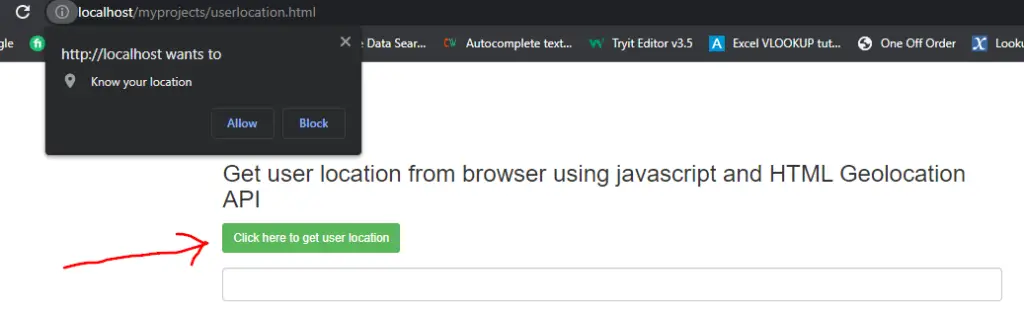

HTML Geolocation API
The HTML Geolocation API is used to get the geographic location of the user with the help of the getCurrentPosition() method.
Steps to get user location from browser using javascript and HTML Geolocation API
Step 1:- We will declare a function inside button type using the onclick event of JavaScript.
Step 2:- Next, we will use that function to return the visitor location if succeed.
Step 3:- After that, we have to check whether the browser supports the geolocation or not with the help of window.navigator.geolocation object as shown below
if(window.navigator.geolocation){
            //alert('Browser support');
            window.navigator.geolocation.getCurrentPosition(mycoords,myerrors);
  }
 else{
            alert('Browser does not support');
   }
Step 4:- Now, if the browser supports, we will pass two parameters (mycoords,myerrors) inside the getCurrentPosition() method.
Step 5:- Now, declare the mycoords() function as shown below
 function mycoords(position){

      var lat = position.coords.latitude;
      var long = position.coords.longitude;
      //alert(lat+'/'+long);
      var myapi = "https://maps.googleapis.com/maps/api/geocode/json?latlng="+lat+","+long+"&key=your API key";

      $.get(myapi,function(data){
        console.log(data);
        $('#user_location').val(data.results[2].formatted_address);
      });
    }
Explanation of the above function
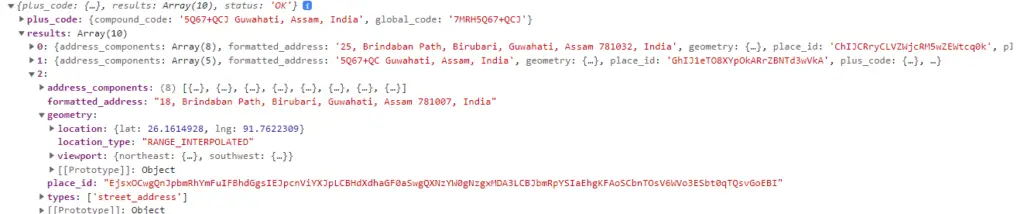
The above function will return the latitude and longitude of the user’s location with the help of the position object and we will pass the lat and long variable to Google geocode API URL to get the address of the user.
To use the Google geocode API, we have to create an API key. If you don’t know how to create an API key then follow the below article
Google places autocomplete example using maps JavaScript API
The Geocode API URL should be as shown below
https://maps.googleapis.com/maps/api/geocode/json?latlng="+lat+","+long+"&key=your API key
If the Geocode API works successfully then you can see the array format of the user location in the console as shown below
Step 6:- Now, declare the myerrors() function as shown below
function myerrors(error){
       if(error.code=0){
          alert('Unknown Error');
       }
       else if(error.code=1){
          alert('Permission Denied');
       }
       else if(error.code=2){
          alert('Position Unavailable');
       }
       else{
          alert('Time Out');
       }
    }
Explanation of the above function
myerrors is the second parameter of the getCurrentPosition() method that is used to handle the errors with an error object that is passed as a parameter inside the myerrors() function. The myerrors() function will be executed if we fail to get the user’s location.
The error object will throw the below errors
- Unknown error.
- Permission Denied.
- Position unavailable.
- Time Out.
Complete Code:-
<!DOCTYPE html>
<html lang="en">
<head>
  <title></title>
  <meta charset="utf-8">
  <meta name="viewport" content="width=device-width, initial-scale=1">
  <link rel="stylesheet" href="https://maxcdn.bootstrapcdn.com/bootstrap/3.4.1/css/bootstrap.min.css">
  <script src="https://ajax.googleapis.com/ajax/libs/jquery/3.6.0/jquery.min.js"></script>
  <script src="https://maxcdn.bootstrapcdn.com/bootstrap/3.4.1/js/bootstrap.min.js"></script>
</head>
<body>
<div class="container" style="width: 60%;">
  <br><br><br><br>
  <h3>Get user location from browser using javascript and HTML Geolocation API</h3>
    <div class="form-group">
      <button type="button" class="btn btn-success btn-sm" onclick="getlocation()">Click here to get user location</button>
    </div>
    <div class="form-group">
      <input type="text" class="form-control" id="user_location">
    </div>
</div>
<script>
  function getlocation(){

        if(window.navigator.geolocation){
            //alert('Browser support');
            window.navigator.geolocation.getCurrentPosition(mycoords,myerrors);
          }
          else{
            alert('Browser does not support');
          }
       }

function mycoords(position){

      var lat = position.coords.latitude;
      var long = position.coords.longitude;
      //alert(lat+'/'+long);
      var myapi = "https://maps.googleapis.com/maps/api/geocode/json?latlng="+lat+","+long+"&key=AIzaSyBh1__iOLq4pmTZES2w8Ss1dWFs2ITWCys";
      $.get(myapi,function(data){
        console.log(data);
        $('#user_location').val(data.results[2].formatted_address);
      });
    }
     function myerrors(error){

       if(error.code=0){
          alert('Unknown Error');
       }
       else if(error.code=1){
          alert('Permission Denied');
       }
       else if(error.code=2){
          alert('Position Unavailable');
       }
       else{
          alert('Time Out');
       }
    }
  </script>
</body>
</html>
Step 7:- Now open the browser and run the HTML file.
Conclusion:- I hope it will help you to understand the overview of user geolocation. If you have any doubt then please leave a comment below.